Automatic Cleanup for Idle Kubernetes Computing Units
Reviewed by Kunwoo Park, Ali Risheh, and Matthew Ball, and advised by Chen Li.
Feature Introduction · Apache Texera
Texera uses computing units (CUs) to run workflows. On a Kubernetes deployment, each CU runs in its own pod. Keeping that pod ready makes the next workflow start faster, but it also means the pod keeps using cluster resources after the work is done.
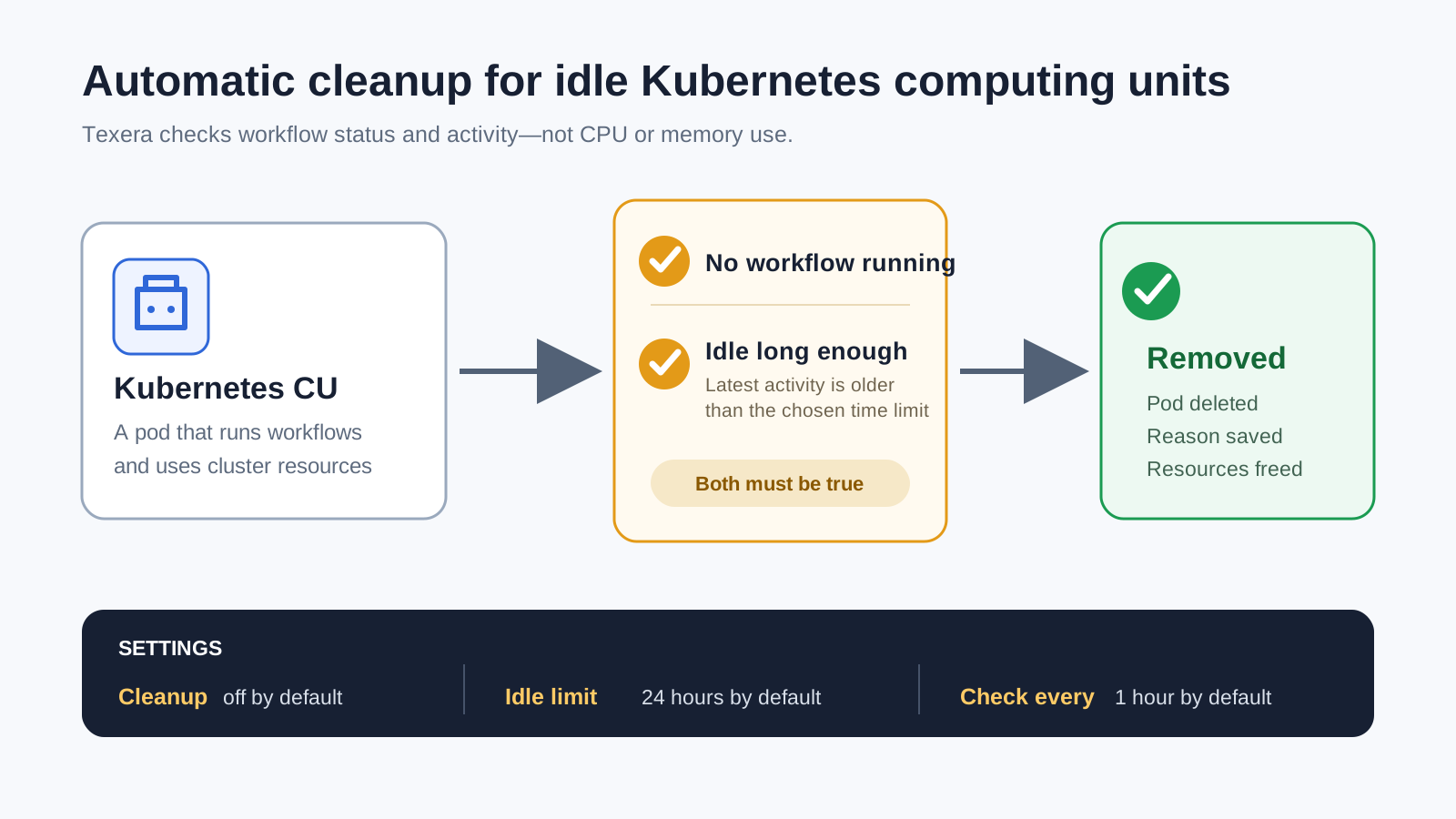
Texera can now clean up CUs that have been unused for a long time. Once an administrator turns on this feature, Texera regularly checks for idle CUs and removes their pods. Running workflows are left alone, while unused CPU and memory become available to the rest of the cluster.
This post explains the feature from a user's point of view. Links to the design discussion and implementation are included at the end for readers who want the technical details.
01 The Problem
A user may create a CU, run a workflow, and then leave Texera. The workflow has finished, but the Kubernetes pod can continue running until someone removes it by hand. On a shared cluster, many forgotten CUs can slowly take resources away from active users.
Kubernetes cannot solve this problem by looking at CPU use alone. A workflow may still be running even when its CPU use is low. Texera has better information: it knows which workflows use each CU and when that CU was last active.
02 What Changes
How Texera Detects an Idle CU
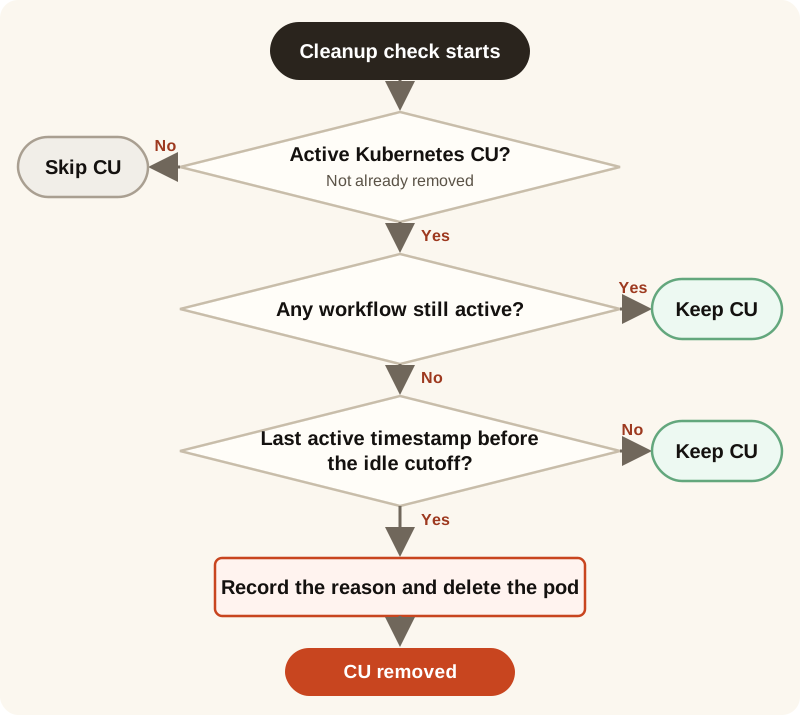
During each cleanup check, Texera looks only at Kubernetes CUs that have not already been removed. It first checks the workflows connected to each CU. If any workflow is still active, Texera keeps the CU, even if it has been running for a long time.
When no workflow is active, Texera calculates the CU's last active timestamp. It uses the most recent time among the CU's creation time, latest workflow start time, and latest workflow update time. Texera then compares the last active timestamp with the idle cutoff. If the timestamp is older than the cutoff, the CU is considered idle; otherwise, Texera keeps it. The database update that marks the CU as terminated repeats the workflow checks. If the CU became active during the scan, the update does nothing and Texera keeps the CU.
03 See It in Action
What the demo shows
The demo creates two CUs and shows how administrators can tell why each one was removed:
- A user removes the first CU manually.
- The second CU is left unused until Texera removes it automatically.
- The service log records the CU and the reason in both cases.
04 What Users Can Expect
Users do not need to start the cleanup or watch a timer. It runs in the background as part of Texera. A CU with a running workflow stays available. A CU that was used recently also stays available, so users can return after a short break without waiting for a new pod.
After a CU has been idle past the chosen limit, Texera removes its Kubernetes pod. If the user needs more computing power later, they can create another CU in the usual way.
The cleanup stays out of the way
- Running workflows are not removed.
- Recently used CUs stay warm for the next workflow.
- Only Kubernetes CUs are included.
- Administrators can tell whether a CU was removed automatically or by a user.
05 Choices for Each Deployment
Different clusters have different needs. A classroom deployment may want CUs to remain available throughout a lab, while a busy shared cluster may want to free resources sooner. Texera therefore lets administrators choose how long a CU may sit idle and how often cleanup runs.
The feature is off by default. When it is enabled, the default idle limit is 24 hours and Texera checks once per hour. Administrators can change both values to match their users and available cluster resources.
06 Looking Ahead
The first version puts safety first. If Texera sees a workflow record that has not finished, it keeps the CU. In an unusual failure, an old workflow record may get stuck and keep an unused CU alive. That is safer than removing a CU that may still be doing work, but it also means some idle CUs may need more checks in the future.
We are tracking that improvement in issue #8618. Future work can compare old workflow records with the real pod status before deciding what to do.
Learn More
This feature began with a community discussion about how Texera should identify and clean up idle computing units. The discussion and implementation are available on GitHub.
Automatic cleanup helps Texera keep shared Kubernetes resources available for the users who need them.